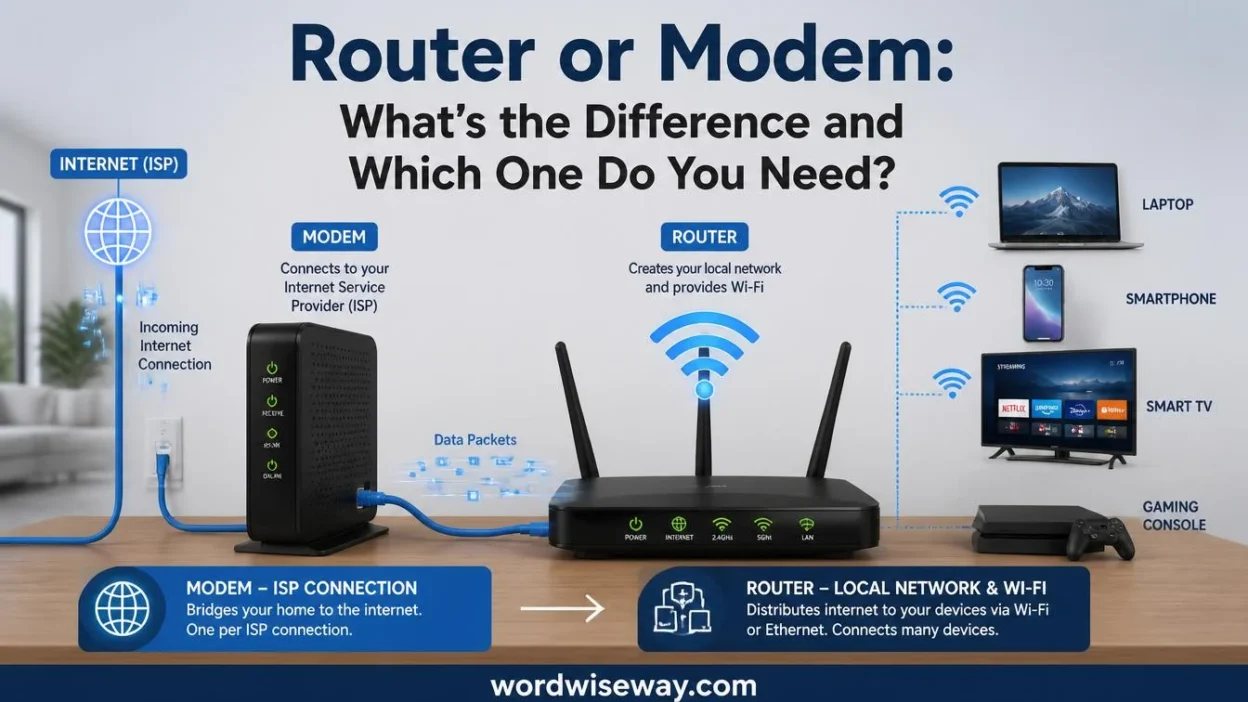
For a computer network at home or in the workplace, Router or Modem: Difference and Which One Do You Need? helps you make informed decisions.
A Modem receives Internet Signals from the Internet Service Provider (ISP) and provides Internet access, while a Router shares the internet connection with wireless devices and other networking devices. Both are electronic equipment used for networking, connectivity, and data transfer.
They can work individually or as an integrated unit. Knowing their functions and differences can save time, money, and frustration when managing your network and equipment.The quick answer for users depends on what they need. A modem connects your network to the provider, while a router shares the connection among multiple devices.
For example, a laptop can use the web through this setup. Understanding their purposes helps prevent common mistakes and makes it easier to choose the right device. The terms Router vs Modem may seem confusing, but their usage is distinct.
This guide applies anywhere, including the US and UK, and helps you use correct terminology in emails, social media, and tech articles.
Quick Answer:
A modem connects your home to your internet provider’s network. It handles the connection coming from technologies such as cable, DSL, or certain other access systems and can provide an Ethernet connection for a router.
A router creates and manages your local network. It directs traffic between your devices and other networks, including the internet. A wireless router also provides Wi-Fi for phones, laptops, TVs, game consoles, and other connected devices.
| Device | Main job | Wi-Fi | Connects to ISP |
| Modem | Provides the connection to the ISP | Usually no | Yes |
| Router | Manages your local network and routes traffic | Often yes | Usually through ISP equipment |
| Modem-router gateway | Performs both functions | Usually yes | Yes |
| Switch | Connects devices within a local network | No | No |
However, there’s an important wrinkle. Not every internet service uses a traditional modem. Fiber connections, for example, may use an ONT or provider-specific equipment instead. Some buildings also provide an Ethernet connection directly to your home, eliminating the need for a traditional modem.
What Is a Modem?
A modem is the equipment that handles the connection between your home and the provider’s access network. In a common cable setup, for example, the modem receives the connection from the cable line and presents a network connection that your router can use.
Google describes a modem as a device that sends information between the outside network, or WAN, and your home. It can convert an incoming connection into Ethernet so a Wi-Fi router can connect to the internet.
The word modem comes from “modulator-demodulator.” Historically, modems converted digital information into signals suitable for transmission over particular communication systems and then converted incoming signals back again.
Modern broadband equipment is considerably more sophisticated than the old dial-up devices associated with that term. The basic idea remains useful, though: the device handles the provider-side connection so your home network can communicate beyond your local network.
What Does a Modem Do?
A modem’s primary responsibilities depend on the type of internet service you have. In a typical compatible broadband setup, it can:
- Establish communication with the ISP.
- Handle the relevant access technology.
- Receive and transmit data over the provider connection.
- Present an Ethernet connection to networking equipment.
- Help the ISP identify and authorize the customer’s connection, depending on the service.
The exact hardware varies considerably. A cable modem isn’t the same thing as DSL equipment, and fiber service may use an ONT rather than a traditional modem.
That distinction prevents a common mistake: assuming every internet connection follows the same hardware chain.
What Happens If You Have a Modem but No Router?
A modem doesn’t automatically mean you have a complete home network.
Suppose you have one compatible modem and connect a computer directly to it. Depending on the ISP and configuration, that computer may be able to access the internet. But that setup doesn’t give you the normal Wi-Fi features of a home router.
A router becomes useful when you want to connect several devices and manage them as one local network.
For example, your household might have:
- A laptop
- Two smartphones
- A smart TV
- A printer
- A game console
- Several smart-home devices
A router provides the networking layer that lets those devices communicate locally while sharing the available internet connection.
What Is a Router?
A router connects networks and directs traffic between them. In a typical home, it sits between your local network and the wider network provided by your ISP.
Think of your home network as a neighborhood with several houses. The router acts like the traffic coordinator at the entrance. It helps determine where packets should go instead of sending every piece of traffic everywhere.
Technically, routers operate at the network layer and use addressing information to forward packets toward their destinations. Data traveling across networks gets divided into packets, which contain information that helps networking equipment move them toward the correct destination.
What Does a Router Do?
A modern home router can perform several important tasks:
- Routes traffic between your local network and other networks.
- Creates a local network for your connected devices.
- Provides Wi-Fi when it includes wireless functionality.
- Provides Ethernet ports for wired connections.
- Assigns local IP addresses to devices through DHCP in common configurations.
- Performs NAT in many home networks.
- Provides network security features, such as firewall capabilities.
- Controls network settings through an administration interface.
The router therefore does much more than simply “give you Wi-Fi.”
Wi-Fi is the wireless connection between your devices and the router. The router itself is responsible for broader network-management tasks.
What’s the Difference?
The cleanest way to understand the router vs. modem debate is to separate the two jobs.
The modem handles the connection toward the ISP. The router handles the network inside your home.
Here’s the practical comparison:
| Feature | Modem | Router |
| Connects to ISP access network | Yes | Usually indirectly |
| Creates local network | Usually not its primary function | Yes |
| Routes traffic between networks | No, not its main role | Yes |
| Provides Wi-Fi | Usually no | Often |
| Provides multiple Ethernet ports | Depends on equipment | Commonly |
| Connects many household devices | Not its primary purpose | Yes |
| Handles local network management | Limited | Yes |
| Can be part of a gateway | Yes | Yes |
The word usually matters here. Networking equipment has evolved, and manufacturers increasingly combine several functions into one box.
That’s why looking at the device’s name alone isn’t always enough.
How a Modem and Router Work Together
A conventional home setup looks like this:
Internet service → Modem or ISP access equipment → Router → Your devices
The modem handles the provider-side connection. The router then manages the local network.
For example, imagine you’re watching a video on your laptop.
Your laptop sends network traffic through Wi-Fi to the router. The router forwards that traffic toward the internet connection. The modem or equivalent access equipment handles the connection to the ISP. Data then travels back through the same general chain until the router delivers it to your laptop.
The process happens incredibly quickly. You don’t manually move anything between the devices. The networking equipment handles the forwarding automatically.
Why You Usually Need Both Functions
You need both internet access and local network management, but you don’t necessarily need two physical boxes.
That’s an important distinction.
You might have options:
A: Separate modem + separate router
B: One modem-router gateway
C: Fiber or another service with provider access equipment + router
D: A building-provided Ethernet connection + router
So the real question isn’t always, “Do I need two devices?”
Instead, ask:
Which networking functions does my internet service already provide?
That question can save you money and prevent unnecessary setup problems.
Modem-Router Combo: One Device That Does Both
A modem-router combo, often called a gateway, combines modem and routing functions in one piece of hardware.
Many ISPs provide these combination devices. Google’s support documentation specifically notes that many ISPs provide equipment with both modem and router functionality.
This arrangement simplifies installation because you don’t need two separate boxes.
Advantages of a Modem-Router Gateway
A combination gateway can offer:
- Simpler installation
- Fewer cables
- Less equipment
- One administration interface
- Easier setup for inexperienced users
Potential Drawbacks
Separate devices can offer greater flexibility.
With separate equipment, you can replace the router without replacing the modem, assuming the modem remains compatible with your service. You can also choose networking equipment based on the coverage and features you need.
However, the best choice depends on your ISP, service type, equipment compatibility, and network requirements.
Router or Modem for Different Internet Types
Your internet technology affects the answer.
Cable Internet
Cable broadband commonly uses a cable modem connected to the provider’s coaxial network.
The modem then connects to a router through Ethernet.
A typical setup looks like:
Coaxial cable → Cable modem → Ethernet → Router → Devices
DSL Internet
It uses telephone-line infrastructure for broadband access. DSL equipment performs the access-side functions required by that service.
The exact hardware depends on the provider and DSL technology.
Fiber Internet
it is where the traditional modem explanation starts to break down.
It services can use an optical network terminal, commonly called an ONT, or other provider equipment. The ONT handles the optical network termination and can provide an Ethernet connection for a router.
Google Fiber, for example, explains that its Fiber Jack can serve the access role, allowing a compatible router to connect directly to it.
So if you have fiber, don’t automatically purchase a cable modem. Check what equipment your fiber provider requires.
Fixed Wireless and Other Services
Fixed wireless, satellite, building-provided internet, and other services can use different equipment arrangements.
In some apartments or dormitories, Ethernet may already be provided at the wall. Google notes that certain buildings can provide internet access without requiring a traditional modem.
The equipment chain depends on the access technology.
Router vs. Modem for Wi-Fi
One of the most common questions is simple:
Does the modem give you Wi-Fi?
Usually, a traditional standalone modem doesn’t provide the full wireless networking function people expect from a home router.
A wireless router creates the Wi-Fi network that your phone or laptop joins.
That’s why a common setup looks like:
Modem → Ethernet cable → Wi-Fi router → Wireless devices
A gateway combines those functions into one device.
Does a Router Give You Internet?
A router can manage your local network without independently providing the physical ISP connection.
If your service requires a modem or ONT, the router needs that upstream connection.
However, some internet services provide Ethernet directly. In those situations, the router may connect directly to the provider’s network equipment.
This is another reason why blanket advice such as “you always need a modem” isn’t accurate.
Why a Better Router Doesn’t Always Increase Internet Speed
Buying a faster router doesn’t automatically increase the speed your ISP provides.
Suppose your internet plan provides a certain maximum connection speed. A router can’t magically turn that service into unlimited bandwidth.
However, a router can still affect your actual experience.
Poor Wi-Fi coverage, outdated wireless standards, interference, weak hardware, congestion, or an overloaded network can create problems inside your home.
The key distinction is:
Internet service speed ≠ Wi-Fi performance
Your internet connection determines how much bandwidth reaches your home. Your router and wireless environment influence how effectively your devices use that connection.
Router vs. Modem for Gaming and Streaming
Gaming
Online gaming depends on more than raw download speed.
Latency, packet loss, network stability, and the quality of the connection all matter. Your router manages traffic between your gaming device and the wider network.
A wired Ethernet connection can also reduce one source of wireless variability because it removes the Wi-Fi link between the device and router.
Streaming
Streaming services transfer large amounts of data over time. If several household members stream simultaneously, all those devices share the available connection.
The router manages the local traffic while the ISP connection determines the internet bandwidth available to the household.
Smart Homes
Modern homes can contain dozens of connected devices.
Phones, laptops, televisions, speakers, cameras, thermostats, printers, and other devices may all depend on the same local network.
As the number of devices grows, router capabilities become increasingly relevant. The router becomes the traffic manager for a surprisingly busy digital household.
Router vs. Modem vs. Switch
A switch is another device that often gets confused with routers and modems.
A network switch primarily connects devices within a local network. A router, by contrast, connects networks and directs traffic between them. Cloudflare distinguishes switches and routers based on their different networking roles.
| Device | Primary purpose |
| Modem | Connects to the ISP access network |
| Router | Connects networks and manages traffic |
| Switch | Connects multiple devices on a local network |
| Gateway | Combines two or more networking functions |
For example, if your router has four Ethernet ports and you need more wired connections, a switch can expand the number of available wired ports.
The switch doesn’t replace the router.
Common Mistakes
Assuming a Router and Modem Are the Same
They aren’t. Their functions overlap only when manufacturers combine them into one gateway.
Buying a Router to Fix an ISP Outage
If your ISP’s connection is down, replacing your router won’t necessarily restore service.
First determine whether the problem affects the internet connection itself or only your home network.
Buying an Incompatible Modem
Not every modem works with every ISP.
Before buying equipment, check your provider’s compatibility requirements. This matters particularly with cable services, where the modem must support the provider’s network technology and approved configuration.
Assuming Fiber Requires a Traditional Modem
Fiber can use an ONT or other provider equipment instead.
Check your provider’s installation requirements before buying hardware.
Assuming More Antennas Automatically Mean Faster Wi-Fi
Antenna count alone doesn’t determine real-world performance.
Wireless performance depends on many factors, including supported standards, channel conditions, device capabilities, placement, interference, and network traffic.
Case Study: A Home With a Gateway
Consider a family with a provider-supplied gateway.
The gateway contains both modem and router functions. Their phones connect through Wi-Fi, while a desktop computer connects through Ethernet.
They don’t necessarily need to buy another modem.
If they want to improve coverage, the more relevant question becomes whether the existing router’s wireless coverage meets their needs. Depending on the equipment, they might consider a better router, mesh system, or another compatible networking solution.
Adding another router without understanding the existing setup can create unnecessary complexity.
Case Study: A Fiber Connection
Now consider a home with fiber internet.
The provider installs fiber termination equipment and supplies a router. There may be no traditional standalone modem in the home.
The fiber equipment handles the provider-side connection. The router handles the customer’s local network.
This setup illustrates why “modem plus router” is a useful general model, but not a universal physical layout.
How to Identify Your Modem and Router
If you’re staring at two black boxes covered with blinking lights, don’t guess.
Start with the labels.
Look for:
- Manufacturer and model number
- “WAN” or “Internet” port
- Ethernet ports
- Coaxial connection
- DSL/telephone connection
- Fiber-related connection
- Wi-Fi network information
- ISP branding
Then check the manufacturer’s documentation or your ISP’s equipment information.
You can also inspect the administration interface. If the device manages wireless networks, DHCP, NAT, firewall settings, or other local-network functions, it’s performing router functions.
A single gateway can show evidence of both modem and router functions.
Do You Need a Modem and a Router?
It depends on your internet service.
You may need separate modem and router equipment with a traditional broadband setup.
Need one gateway that combines both functions.
You may have fiber access equipment plus a router.
Or your building may provide an Ethernet connection directly to your home.
Before buying anything, check these three things:
- What type of internet service do you have?
- What equipment has your ISP already provided?
- Which functions does that equipment perform?
That three-question check is far more useful than simply searching for a “better modem.”
Read More: W-2 vs. 1099: Difference and Which One Is Right for You?
FAQs
1. Is a modem the same as a router?
No, a modem and a router have different jobs. A modem connects your home or workplace network to your Internet Service Provider, while a router distributes that internet connection to several devices. Some modern devices combine both functions into one unit.
2. Do I need both a modem and a router?
Usually, you need both functions to create a complete home network, but you don’t always need two separate physical devices. Your provider may supply a gateway that combines a modem and router. If you already have one, check its specifications before buying another device.
3. Which device connects directly to the internet provider?
The modem normally connects directly to the Internet Service Provider’s incoming service. It receives the internet signal and translates it into a connection your network can use. The router then manages how that connection reaches your computers, phones, TVs, and other devices.
4. Can a router work without a modem?
A router can manage a local network without a modem, but it still needs an internet source to provide online access. For example, it can distribute an existing connection from another network device. So, a router alone doesn’t normally replace the modem’s connection to the provider.
5. Can a modem provide Wi-Fi?
A basic modem usually doesn’t provide Wi-Fi by itself. Wi-Fi is typically handled by a router. However, many modern gateway devices combine modem and router functions, allowing one piece of equipment to connect to the provider and provide wireless access.
6. What does a router do for multiple devices?
A router shares an internet connection among multiple devices on your network. It can connect laptops, phones, tablets, smart TVs, and other compatible equipment. It also helps direct data to the correct device instead of sending every piece of information everywhere.
7. Is a modem or router more important for internet access?
Both can play important roles, but they aren’t interchangeable. The modem provides the connection between your network and the Internet Service Provider, while the router distributes that connection locally. If your setup combines both functions, one device can handle both jobs.
8. Should I buy a separate modem and router?
A separate setup can give you more flexibility because you can choose each device according to your needs. You can also replace one component without replacing the other. However, an integrated gateway may be simpler if you prefer fewer devices and easier setup.
9. What is the difference between Router vs Modem?
The main Router vs Modem difference is their role in networking. A modem communicates with your Internet Service Provider, while a router manages the connection inside your home or workplace and shares internet access with connected devices.
10. How do I know which device I need?
Start by checking what equipment your Internet Service Provider has already provided. If you have a modem but no Wi-Fi, you may need a router. If you have a combined gateway, you may not need another device unless you want additional features or broader network coverage.
Conclusion
Understanding the difference between a router and a modem makes setting up an internet connection much less confusing. The modem handles communication with your Internet Service Provider, while the router distributes that connection across your network. Once you know these separate roles, choosing equipment becomes a much simpler task.
Your best choice depends on your current setup, internet service, number of devices, and networking needs. A separate modem and router can offer flexibility, while an integrated gateway can keep things straightforward. Before buying anything, check your provider’s compatibility requirements and identify which networking function your existing equipment already handles.

Evelyn Shaw has spent 14 years at Yale University’s English Department, leading students through close readings, genre studies, and interpretive methodologies. Her scholarly interests include Renaissance drama, gothic fiction, feminist literary criticism, and archival research and examining how texts generate meaning across historical periods. Evelyn has presented at major academic conferences and published essays in peer-reviewed journals, reflecting her passion for rigorous analysis and student-centered learning.